
Marathi typing genuinely is harder to get fast at than English — and it's not because you don't know Marathi. It's the script. Devanagari has matras, conjunct consonants and a layout most people never learned as children, unlike the English QWERTY keyboard many of us grew up typing on informally. If your Marathi speed is lagging behind your English speed, this is normal — and fixable.
Why Marathi typing feels slower at first
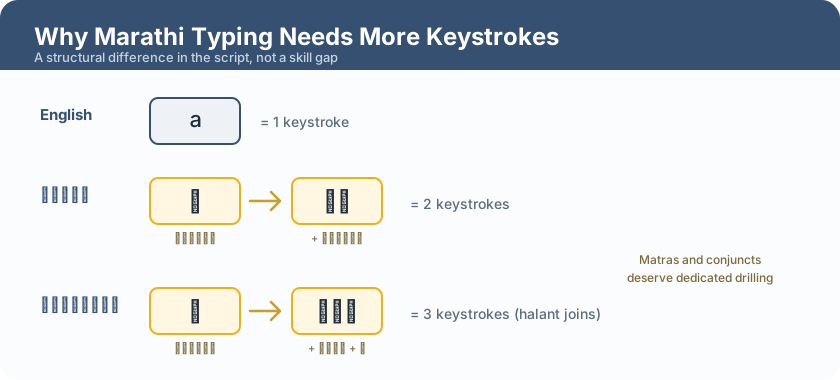
In English, one key press usually means one letter. In Devanagari, a single spoken syllable can take two or three key presses — the consonant, then a matra (vowel sign), sometimes a halant for a conjunct. So a passage that "looks" the same length as an English one can genuinely take more keystrokes to type. This isn't a flaw in you; it's a structural difference in the script, and once you know it, you can practise around it deliberately.
Learn the layout properly — don't hunt for keys
Most Marathi typing on a computer uses the Inscript keyboard layout (the standard layout for Devanagari, including in most typing-certificate exams). Learning it properly — which finger types which key, without looking — pays off far more in Marathi than in English, precisely because there are more keys to reach for. Spend real time on a layout chart before you start racing for speed.
The specific things that slow Marathi typists down
- Matras (vowel signs) — some attach before the consonant, some after, some above or below. Getting the order right (not just hitting the right keys) takes deliberate practice — many early mistakes are matras typed out of sequence, not wrong keys.
- Conjunct consonants (जोडाक्षरे) — words like क्ष, ज्ञ, त्र combine two or more consonants. These need a halant key press to "join" the letters, which is an extra step English typists never have to think about.
- Similar-looking keys — several Devanagari characters sit close together on the layout and are easy to mix up under time pressure (ब/भ, द/ध, and similar pairs). Drilling these specifically — not just typing generic passages — clears this up fastest.
- Switching mental mode — if you also type in English, jumping between scripts mid-practice can slow you down. Dedicate blocks of practice time to Marathi only, especially early on.
How to actually build Marathi speed
- Start with common, high-frequency words — not whole exam-length passages. Get comfortable with everyday Marathi words before you chase paragraph speed.
- Drill matras and conjuncts separately — a few minutes a day specifically on these, rather than only full passages, fixes the exact things that are slowing you down.
- Type real GCC-TBC-style content — letters, statements and passages in Marathi, not just generic text. The exam has its own vocabulary and phrasing patterns, and practising on that exact style builds real, transferable speed.
- Track accuracy separately from speed — Marathi mistakes are easy to make and easy to miss when you're focused on going fast. Slow down, get clean, then speed up — the same accuracy-first principle that applies to English typing applies even more here.
A realistic expectation
Don't expect your Marathi WPM to match your English WPM immediately, even if you're a native, fluent Marathi speaker — speaking and typing are different skills, and the script genuinely takes more keystrokes per syllable. With focused practice, most people close most of that gap within a few weeks. What matters for GCC-TBC is clearing the speed tier you're aiming for (30 or 40 WPM) with clean accuracy — not matching your English number exactly.
Practise where the mistakes actually get caught
Generic typing games often don't distinguish between "wrong key" and "matra out of order," so you can practise for weeks without knowing what's actually holding your Marathi speed back. Practising on the real GCC-TBC pattern — with Marathi-specific content and accurate marking — shows you exactly where your errors are, so your practice time goes toward fixing the real problem instead of just repeating it.
Frequently asked questions
Why is my Marathi typing so much slower than my English typing?
Devanagari needs more keystrokes per syllable (consonant + matra, sometimes a halant for conjuncts), so it's structurally slower to type at first — this is normal, not a sign you're doing something wrong.
What keyboard layout should I use for Marathi?
The Inscript layout is the standard for Devanagari typing, including for GCC-TBC. Learn it properly rather than switching between different unofficial layouts.
How long does it take to get fast at Marathi typing?
With focused daily practice, most learners see steady improvement within 4–8 weeks — similar to the timeline for English, but starting from a slower baseline due to the script.
Should I practise typing in Marathi and English on the same day?
It's fine, but keep the sessions separate rather than switching scripts mid-drill — jumping between them mid-practice slows both down.
Note: Exam pattern, speeds and language requirements follow recent MSCE notifications and can be revised — always confirm the current official notification at mscepune.in before you apply.
---