
Typing is a self-trainable skill, and GCC-TBC has a fixed, well-defined pattern. With the right tool and a bit of discipline, plenty of people prepare successfully at home. Here's how to do it properly.
What you actually need
You don't need much — but you do need the right things:
- A practice tool that matches the real exam — the actual layout, the 10-minute timer, the no-backspace rule, and marking like the board's. This is the one thing you can't skip.
- A daily routine — 30 focused minutes a day beats occasional long sessions.
- Coverage of every component — the speed passage, letter, statement and e-mail, plus the 30-mark theory MCQs.
- A computer with your exam language set up (Marathi / English / Hindi).
That's it. No classroom required — just consistency and honest feedback on where you stand.
Why generic online typing tests aren't enough
Free typing websites are fine for warming up your fingers, but they'll quietly mislead you. They only test a plain passage — no business letter, no statement/table, no e-mail, and none of the board's marking rules. So you can score "60 WPM" online and still be unprepared for the actual exam, because the exam is more than raw speed. Practise on the real GCC-TBC pattern, or your practice score won't mean much.
A simple home routine
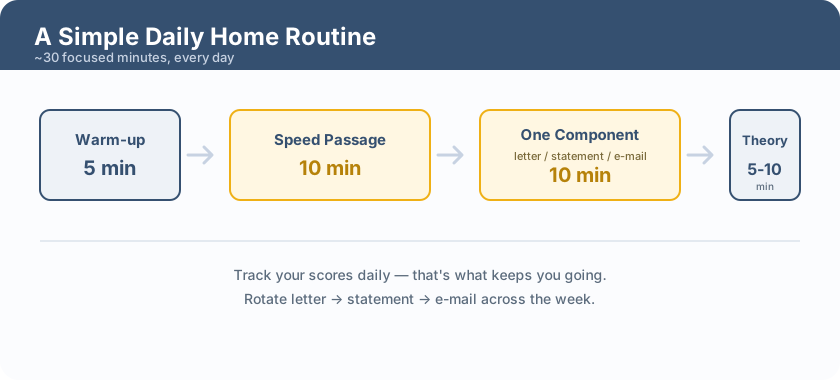
- Warm-up (5 min): loosen up with a short accuracy drill.
- Speed passage (10 min): one full timed run, exactly like the exam.
- One component (10 min): rotate through letter → statement → e-mail across the week.
- Theory (5–10 min): a set of MCQs, then revise what you got wrong.
Twenty to thirty minutes, every day. Track your scores so you can see the improvement — that's what keeps you going.
Try before you commit anything
Before spending money on any software or class, it's worth seeing what "real-pattern practice" actually feels like. GradeTyping has a free browser demo of GCC-TBC Mentor — no install, sample content — so you can try the speed passage, a letter, a statement and the theory MCQs right away, and judge for yourself. If it fits how you learn, the full version unlocks all the lessons, all three languages and the complete question bank.
When a class still helps
Self-study isn't for everyone. A class can help if you struggle to stay disciplined alone, if you're completely new to computers, or if you want someone to correct your technique in person. Even then, you'll get far more out of it by practising daily at home between classes — the practice is what actually builds the skill.
Frequently asked questions
What device do I need?
A Windows computer or laptop set up with your exam language. The typing exam is on a computer, so practise on one.
How many months of practice will I need?
It varies, but most beginners who practise daily are exam-ready in roughly 1–3 months. Accuracy-first practice gets you there faster.
Is there a free way to start?
Yes — try the free browser demo first. It runs in your browser with sample data, no install and no payment, so you can see the real exam pattern before deciding.
Note: Exam pattern, fees and dates follow recent MSCE notifications and can be revised — always confirm the current official notification at mscepune.in before you apply.
---